
New email security trial
Posted on Tuesday 2 June 2026
The security tool, Proofpoint’s Adaptive Data Loss Prevention (ADLP) will act as an automated safety net, to help staff avoid accidentally sharing sensitive data outside the organisation or to the wrong place. The trial will help us understand how often this happens and how best to support staff in keeping University data safe.
Background and rationale
Protecting personal data, research outputs and confidential information as it moves around and out of the University of York is an ongoing challenge. The vast majority of data leaks are entirely accidental and whilst existing policy is vital, it only goes so far on its own. Proofpoint’s Adaptive Data Loss Prevention (ADLP) offers an additional, automated safety net that spans the institution. The trial will help us to better understand how often sensitive data unintentionally leaves the University and how to better support staff at the point of transfer.
Overview
Proofpoint ADLP uses machine learning and behavioural analytics to learn typical email sending patterns.
- During the trial, the tool will “hold” emails that look to be heading to a sender's personal email address.
- It will prompt users to review internal policy and then confirm they’re happy to proceed via email.
Benefits
The trial will give us a much clearer picture of how often sensitive data may be leaving the University which will be used to inform future decision making by the Information Security Board (ISB).
The tool will act as a safeguard to give you a moment to sense-check your email, not a barrier to block your work, ultimately helping colleagues to avoid accidental disclosure before it happens.
Controls and security
This trial has been planned in consultation with the Information Security Board, the Data Protection team, HR and the Unions.
- No content reading: Proofpoint staff do not have access to email message bodies or attachments.
- Restricted access: System access at the University of York will be restricted to a small, defined subset of Cyber Security, secured with MFA and with all activity logged.
- No performance monitoring: This trial is designed to gather institutional, aggregate insights. It is not being used to track individual behavior.
For the vast majority of your everyday emails, you won’t notice any change. If you regularly email personal addresses for business and you receive the prompt, simply click confirm and continue.
Questions
Any questions in relation to this exercise can be directed to the IT Support Office (ITSO) and a member of the Cyber Security team will respond.
Frequently Asked Questions
What is changing and when?
From Tuesday 9 June, the University is running a time-limited trial of a Proofpoint email security tool. If an email looks like it's heading to a sender's personal email address, they'll receive an email to prompt them to review internal policy and ask them to confirm they're happy to send it before it goes. Nothing else about how you use email changes.
Why is this happening?
Sensitive information such as personal data, research information and confidential material occasionally leaves the University unintentionally, often by simple accident. The trial helps us understand how often this happens and how best to support colleagues in keeping University data safe.
What will I actually see?
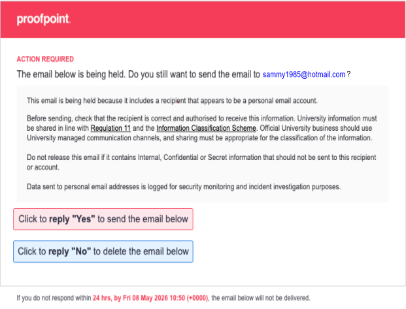
If a message you're sending matches the criteria, you'll receive an email prompt from tessian@york.ac.uk asking you to confirm the action before it sends. This will look similar to the alert below. For most emails you'll see nothing at all.
Will it stop me sending my email?
The system will hold matched emails until you confirm the prompt, so it's designed to give you time to sense-check what you’re doing, not to prevent you from sending. Once you confirm, your email goes as normal.
Does this mean my emails are being read?
Proofpoint staff do not have access to your message contents or attachments during the trial. The tool works by recognising patterns - such as where a message is going and the type of content involved - rather than by someone reading your email.
Who can see the tool's findings?
Access is restricted to a small, defined group within the University of York Cyber Security team and is secured with MFA. The trial produces aggregate insight to inform the Information Security Board.
Is this monitoring my individual behaviour or productivity?
No. The purpose is to understand how often sensitive data may be leaving the University unintentionally across the institution as a whole, not to monitor or assess individuals. The approach has been developed in consultation with Data Protection, HR and the Unions.
What counts as a "personal email address"?
Broadly, addresses that you may own outside of professional domains, for example common webmail providers (yahoo, hotmail, icloud etc).
What if I get a prompt for an email that's completely legitimate?
That's fine and expected, some flagged emails will be perfectly legitimate. Confirm that you're happy to proceed and the email will be sent. The trial is partly about understanding how often these situations arise.
I work with research data / collaborators / external partners or in admissions. Will this disrupt my work?
It shouldn't. The tool adds a confirmation step in specific cases rather than restricting where you can send. If you find it's appearing unexpectedly often for routine, legitimate work, let the Cyber Security team know, any feedback is useful to the trial.
What happens to the data the tool collects?
It's used to build an aggregate picture of how often University data may be leaving the University unintentionally, to inform future decisions by the Information Security Board. Access to this data is logged and tightly restricted.
What will Cyber Security learn from this pilot?
We currently have the functionality to do ‘pattern matching’ in email and to block sending where we think it may be sensitive (e.g. bank account numbers, NI, credit card etc) This is a very blunt tool and not really suitable for the University. This pilot may make the case for expanding how we securely share information outside the University and help promote existing tools such as Globus, Drop-off or Deposit.
Who do I contact with questions or problems?
Please direct any questions to the IT Support Office (ITSO) and a member of the Cyber Security team will respond.