2. Definition phase

My top tip for this phase. This might look like a lot of resources but if you thoroughly consider and use the templates that are relevant to your project now - the rest of the project will run itself.
Cheryl Saggers, Head of Project Management Office (Strategic Portfolio)
1. Project initiation document (PID)
Define what the project is aiming to achieve.
Additional resource:
- Describe the change on one page (document your change succinctly, including its impact, what will good look like and what the next steps are)
2. Business case
Provide rationale for the project or change. Clarify scope, delivery methods, resources, risks, benefits and timelines.
- Business case template (large projects)
- Not required for smaller-scale projects
Identify strengths, weakness, opportunities and threats (SWOT analysis)
A SWOT analysis is a planning tool that seeks to identify the strengths, weaknesses, opportunities and threats. These could be for a project, team or organisation.
- It’s a framework used to test your current position and develop a plan or strategy.
- It helps you to assess internal and external factors, as well as current and future potential.
- Explore questions about internal strengths and weaknesses (within your team or organisation).
- Ask questions about opportunities and threats that lie outside your organisation.
- Build on your strengths and opportunities and mitigate your weaknesses and threats.
| Strengths | Weaknesses |
|---|---|
|
|
| Opportunities | Threats |
|
|
3. Project benefits
Identify, review and document the benefits of the project or change.
- Benefits mapping template (small projects)
- Benefits management plan template (large projects)
- A guide to evidencing the benefits of change in higher education
4. Project schedule
Define the end-to-end timeline, considering dependencies and resources.
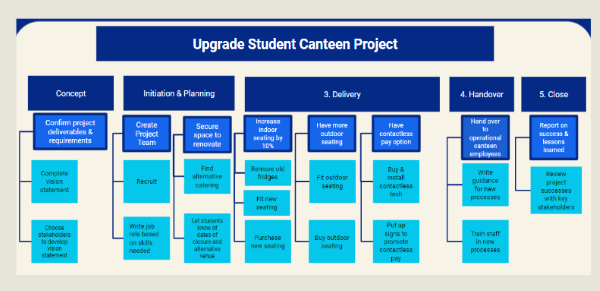
Break down your project into manageable sections using work breakdown structure (WBS)
The first step is to identify the main deliverables of a project by considering:
- What are the desired business outcomes?
- What are the desired technical products?
You can then start breaking down activities into smaller chunks of work.
You can choose how to display your WBS and go into as much or as little detail as you want. Some people use a tree structure, while others use lists or tables.
Work Breakdown Structure guidance
Map dependencies
Project dependencies describe relationships between work projects. This helps determine the order and timeline of a set of tasks for the team.
In large projects, there are often many individual tasks involved. Keeping track of them all can be challenging.
Dependency mapping helps manage and schedule tasks. It also helps consider project requirements in order.
Critical path mapping
Once you've decided on tasks, you'll need to develop a project timeline and milestones.
When scheduling work packages, it’s important to understand how long each of these will take. This will allow proper allocation of resources, budget and time. This will also reveal how long the project will take from start to finish.
This flowchart below is an example of a critical path map. Once you've identified the activities and their dependencies, you can draw the critical path map. It acts as a visual presentation of the order of your activities based on dependencies.
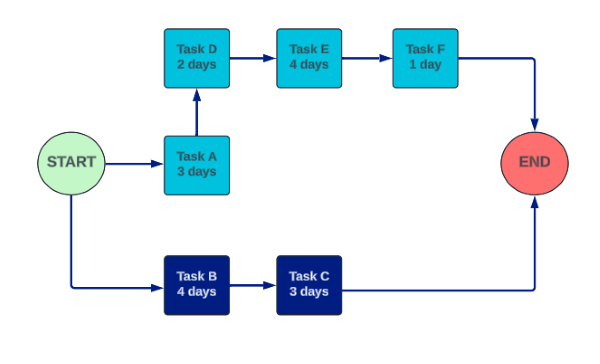
Critical path mapping guidance
More information about critical path mapping
Watch this video about critical path methodology in project management.
5. Communications strategy and stakeholder engagement plan
Structure how you'll communicate with stakeholders.
- Communications and stakeholder engagement plan template (large projects)
- Small projects can use the same template but may not require as much detail
6. Roles and responsibilities (RACI)
Provide direction and give responsibility.
Further guidance:
- Typical roles and responsibilities for strategic change
- Project Manager and Business Analyst: Clarity of roles
- Project sponsor: roles and responsibilities
7. Project board and governance
Provide structure and purpose for your project board.
- Project board: Terms of reference template (small projects)
- Project board: Terms of reference template (large projects)
8. Equality impact assessment
Help make sure our practices are inclusive.
9. Data protection impact assessment (DPIA)
Carried out before any planned project involving personal data.
10. Risks, issues and dependencies (RAID)
Identify and monitor risks, challenges, blockages, decisions and actions.
Further guidance:
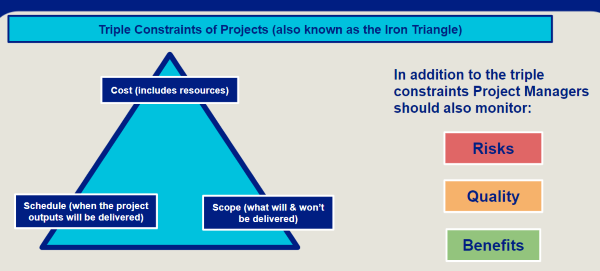
Triple constraints of project management
The triple constraints theory in project management are three interdependent constraints which should be addressed and adjusted when managing projects:
- cost (including resources)
- schedule (when the project outputs will be delivered)
- scope (what will and won't be delivered).
In addition you should also monitor:
- risks
- quality
- benefits.
Ready for the next phase? Your project sponsor should review everything from this phase. They should provide formal approval that the project is ready to move on.